

Operator Preferences
When you run Thoroughbred Query-IV the system displays the Query Control Window:
Query Control Window
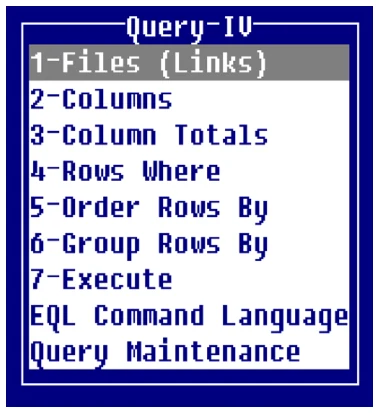
If you access Thoroughbred Query-IV by pressing F1 and selecting Query the system displays the Query View.
From the Query Framer the following function keys are available:
Enter To select an option
- F4
- To exit the Query Framer
- F6
- To display online help
- F7
- To access the Special Functions
To set the Operator Preferences select F7 to access the Special functions then select Operator Preferences.
The system displays a screen similar to the following:
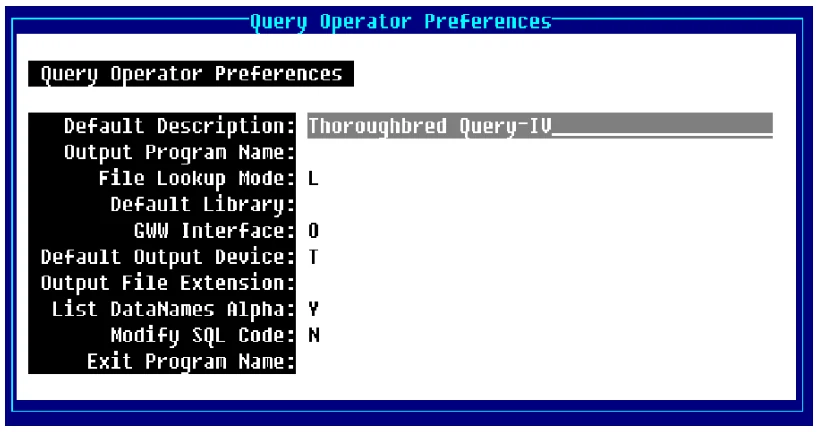
You may enter the following information:
Default Description Type up to 30 alphanumeric characters for the description and press Enter. This heading displays when the output is to a printer or the EQL Heading is on. For more information, see the Output Options (Heading) section of the EQL Command Language section in this document.
Output Program Name Type the 3 to 8 alphanumeric character program name. This is program to be executed when the query output is directed to a file that will be executed prior to printing any detail to the file.
You can use it to manipulate detail into a specific file format. The output program should be a public script that receives two variables. The first is a numeric containing the output channel. The second is a string containing the detail record.
File Lookup Mode Allows access to Dictionary definitions through Links or Schemas. When in the Link mode you have access to all Links. When in the Schema mode you only have access to defined Schemas.
L Displays only Links (single files) when you select 1-Files (Links). When you request Data Names, the system displays Data Names for Links.
S Displays only Schemas (predefined databases) when you select 1-Files (Links). When you request Data Names, the system displays Data Names for Schemas.
For more information about Schemas, see the Query Maintenance section of this document.
Default Library Type the 2 alphanumeric character library name to be used as a default for Link name selection and press Enter. Once Links are selected, the last Link name will be used as a pointer.
This option is only applicable for creating new queries. If no name is specified, Query-IV will start with the first non-numeric library.
GWW Interface
Allows you to select the GWW start flag as on or off. Press Enter select one of the following:
N To turn the GWW interface on
O To turn the GWW interface off.
If GWW has not been started the flag will be set to N/A for the session.
This interface displays when you press F7 Special Functions at the Query Control Window.
Default Output Device
Allows you to select File, Printer, or Terminal as the default output device for your queries.
Select one of the following:
- F
- Query-IV will output the results to a file. The name of the file will be the same as your query with an optional extension. This extension comes from the Output File Extensions field (see below). You may select an Output Program Name.
- P
- Query-IV will prompt you for a printer each time you execute. The Default Description displays on these queries.
- T
- Query-IV will output the results to your terminal.
- E
- Query-IV will output the results to Microsoft Excel. Each time Excel is selected for output, a new Excel workbook is created. To change workbooks, select the appropriate Microsoft Excel Book in the task bar; or from the Excel menubar select the Window option and then select the appropriate Book (window).

Output File Extension Type the characters for the default extension to be added and output to a file and press Enter. The file name for output will be the name of the query plus an extension.
If no extension exists, your operator code will be used.
Example:
Q4SAMPLE.TXT
Q4SAMPLE.WKS
Q$SAMPLE.DIF
Where Q4.SAMPLE is the query name and TXT, WKS, and DIF is the output extension.
List DataNames Alpha Allows you to select the order in which data names are displayed. Press Enter to select alphabetical or physical.
Select one of the following:
Y Whenever the system displays Data Names in Query-IV, they will list in alphabetical order.
N Whenever the system displays Data Names in Query-IV, they will list in physical order. This is the order of entry in Format definition.
Modify SQL Code Allows developers the option to modify the generated SQL code. Prior to syntax checking and execution, if this flag is set to Y, Query-IV passes the current SQL request to a public script to make any modifications that are necessary. Modifications at this level are often related to the WHERE condition.
When this option is used, Query-IV executes:
RUN PUBLIC "Q4WHERE",Q0$Q0$- contains the current SQL request.
Select one of the following:
- Y
- Allows you to modify SQL code.
- N
- Does not allow you to modify SQL code.
If you select Yes, Query-IV will pass the current SQL request to a public script. Here you can make any modifications that are necessary prior to syntax checking and execution.
When this option is used, Query-IV will execute:
RUN PUBLIC "Q4WHERE",Q0$Q0$- contains the current SQL request.

Exit Program Name Type up to 8 alphanumeric characters for the name of the program to execute when exiting Query -IV. Press Enter. To return to a Dictionary-IV menu, use the default program name ID. To return to the operating system type the value [SYSTEM].
The default is ID.
From the Query-IV Reference, version 8.9.1. Open this page in the PDF