

How to Manage Compilation Errors
You must remove errors from scripts to produce working programs. The following sections describe how to manage common compilation problems:
- How to Use the Compile Error Report describes how to get a list of the errors produced during compilation.
- How to Resize Scripts and Programs describes strategies you can use when scripts or programs are too large to be compiled.
How to Use the Compile Error Report
Section titled “How to Use the Compile Error Report”The Compile Error Report makes a list of the errors produced by the last compile. When you compile a script or a group of scripts, all errors are written to the compile error log file. When you perform a new compile, this file is overwritten.
To display the compile error log, go to the Dictionary-IV Development Menu. Type 8 and press the Enter key. If the compiler found errors, a screen similar to the following will be displayed:
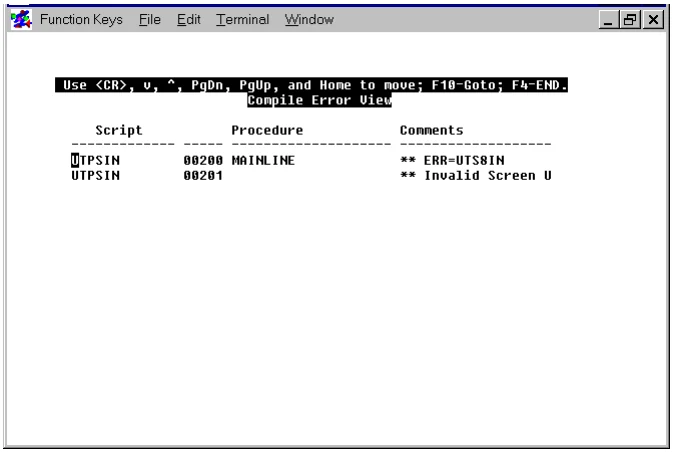
To move through the screen, press the down arrow, up arrow, Page Down, Page Up, or Home key. To go to a specific line, press the F10 key.
To exit the utility, press the F4 key. The following message will be displayed:
Do you want a printed copy (Y/N)?Enter one of the following:
Y prompts you to enter a printer code where the hard copy will be produced.
N exits the utility and returns you to the Dictionary-IV Development Menu.
How to Resize Scripts
Section titled “How to Resize Scripts”If a script is too large, the script will not be compiled and the following message will be displayed:
Generated code is nnnnnn bytes and cannot be savedA compiled script cannot exceed 64K. If a script is too large, consider turning parts of the script into overlay scripts. For more information on overlay scripts see the section on Different Types of Scripts in this manual.
From the Script-IV Developer Guide, version 8.9.1. Open this page in the PDF