

F8 Search and Replace
Search and Replace can be performed on individual source modules by loading the source module in the Source-IV editor and then pressing F8.
Search and Replace can be performed on an entire source module by highlighting the desired source library in the Library File View and then pressing F8.
When you press F8 the system displays the following search and replace window:

Modify the command line to perform the search or replace.
S searches.
R replaces.
/ defines search and search/replace values.
; defines search/replace pairs of values.
N not case sensitive searches (use C for case sensitive).
V verifies before each replace (use N for no verification before replace).
Use the above to define the type of search or replace you will conduct. On the following line type the value(s) to search for or to replace.
Search Searches the document or source library for the specified strings. Once the operation is defined execute or terminate the search with one of the following function keys:
F4 – Exits the Search and Replace window.
F8 – Searches the source document or source library. Each matching term will be highlighted and the search paused. Press Enter to continue searching or press F4 to terminate the search.
F7 – Perform a Search Summary on a source library. Unlike F8, when a match is found the search will not pause, it will automatically continue on to the next source module. When the entire library has been searched, a Search Summary View will display a list of all the source modules containing a matched term.
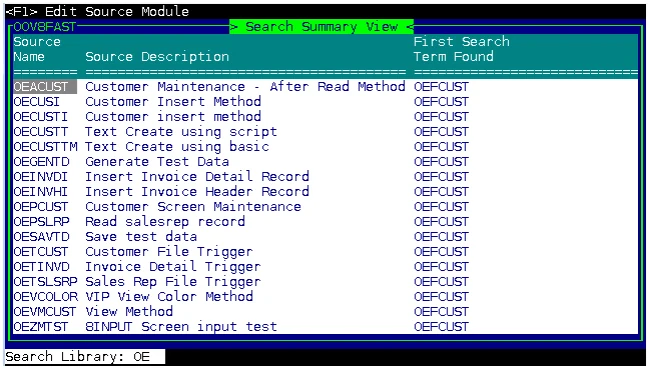
Pressing F1 on a source module name will load the source in the Source-IV editor.
The search results are written to work file WRKF8+FID(0). The results remain available until the same task identifier (tty) executes another search summary. At any time, the current results can be viewed using View OOV8FAST.
If a search operation is initiated using F8, when a match is highlighted press F7 to start a search
summary. The summary will include source modules starting with the next match.
Examples:
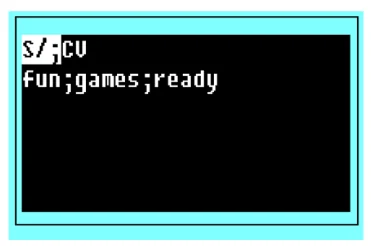
Searches the document or source library. When initiated with F8 the words fun, games, and ready will be highlighted. Press Enter to continue searching for the next match. When initiated with F7 no interaction is required, the source module will be added to the search summary. Only lowercase versions of the words will be located. The V (verification) has no meaning for searches.
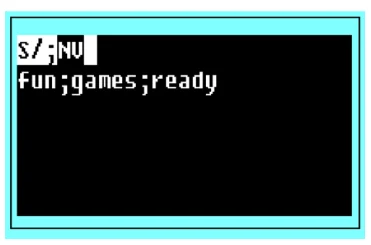
Searches the document or source library as in the previous example, except all versions of fun, games, and ready will be found regardless of uppercase or lowercase. The V (verification) has no meaning for searches.
Replace
Searches the document or source library for specified strings and replaces all locations with new strings.
Examples:
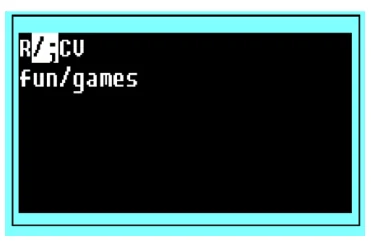
Searches the document or source library and highlights the word fun and provides option to replace fun with games. Only lowercase versions of the words will be located. Each find must be verified.
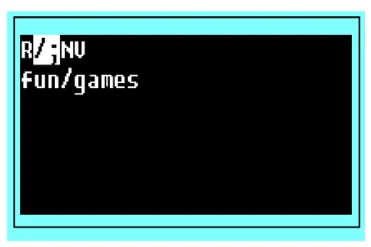
Searches the document or source library as in the previous example, except all versions of fun will be found regardless of uppercase or lowercase. Each find must be verified for replacement.
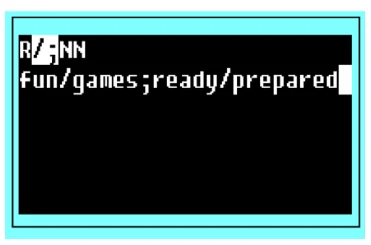
Searches the document or source library and highlights the words fun (replacing them with games) and ready (replacing them with prepared) regardless uppercase or lowercase. The N in the verify position specifies that locations will be replaced without verification.
Commands
Allows you to delete text from the document.

Deletes all text lines from the beginning of the document to and including the line where the cursor is located.

Deletes all text lines from and including the line where the cursor is located to the last line in the document.
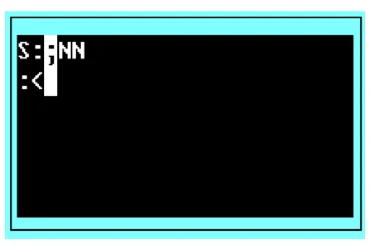
Deletes, as in the first example. The setting of the search-replace delimiter also identifies the command character.
The other option values have no meaning in the command operation.
From the Source-IV, version 8.9.1. Open this page in the PDF