

Using TS Network DataServer
The following describes how to access and manage server connections.
Operating System Interface
Section titled “Operating System Interface”The Thoroughbred server makes any Thoroughbred native file accessible to a client. This includes Programs and Object Libraries. Your entire application may reside on the server.
If your application does an operating system check, the results are based on the Client Basic. It is important to understand that instructions that are operating system specific may not generate expected results.
Server Process
Section titled “Server Process”Starting the Server Process
Section titled “Starting the Server Process”The installation sets up the Thoroughbred server as an automatic service. The server process is initiated each time the system is started.
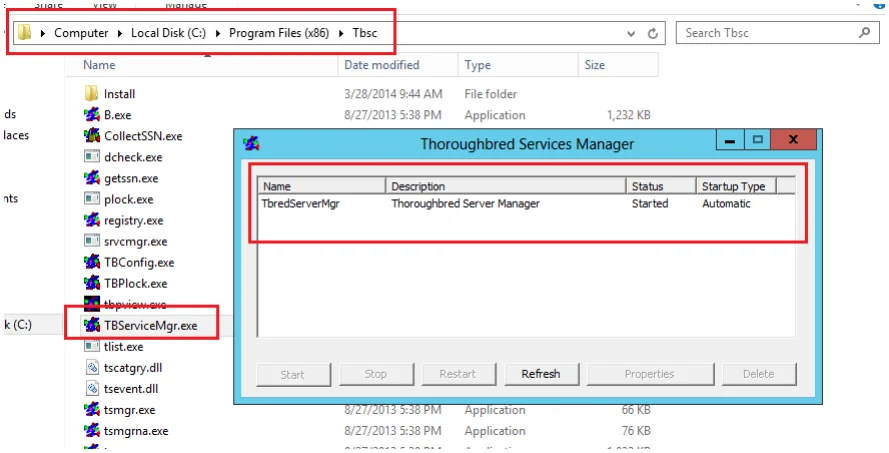
You can manually start and stop the Server Process through Services in the Control Panel. The server can also be managed by running TbServiceMgr.exe. This can be used to Start or Stop the service, view version information, and modify properties like the port number.
Example Thoroughbred Services Managers on Server 2012:
Managing the Server Processes
Section titled “Managing the Server Processes”A server system that is running properly has one instance of the Startup Program (tsmgr) running and one instance of the Server Process (tsserv) running for every client that is connected.
For a given client machine and server system, there is a one-to-one correspondence between the client and server processes. When a client connects to a server, a Server Process is created for that client by tsmgr. When the client quits, the associated Server Process (tsserv) also terminates.
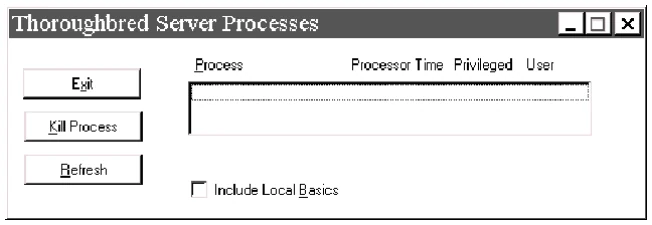
The Thoroughbred utility tbpview.exe can be used to produce a listing of processes that are currently running. This program can be found in the Thoroughbred folder (e.g. C:\Program Files\Tbsc). When tsmgr is not running, the (empty) output should be similar to the following dialog box:
List of Processes Currently Running
Client Connection
Section titled “Client Connection”Once the Server Process is up and running, clients can begin to connect.
For each DEV line in the IPLINPUT file that specifies a connection to a server, an attempt is made to connect to that server.
- If an existing connection already exists, the existing virtual circuit will be used for communication.
- If no existing connection exists, a virtual circuit to the server will be created.
- If a connection cannot be made, an appropriate error message will be displayed. The device will be disabled.
Managing Shortcuts and IPLINPUT Files
Section titled “Managing Shortcuts and IPLINPUT Files”Do not modify the shortcut created by the installation. If a different shortcut is required use the Windows shortcut wizard to create a new desktop shortcut
To specify an alternate IPLINPUT file create a new desktop shortcut using the same target and start in values as the default shortcut created by the installation. Modify the target value, specifying the IPL file name after the b.exe. Example target: H:\b.exe MYIPLINPUT.txt.
Specifying a Task ID is not recommended. See the TERM.MAP section for details.
Basic can only be run from a shortcut with a target value pointing to the Basic executables folder and a start in value pointing to the application data directory. For more information, please see the Install Client Windows Desktop workstation or Windows Server class machine section of this manual.
Managing the Number of Connections
Section titled “Managing the Number of Connections”The server manages the number of connections. Each time a new connection is initialized by a client, the user count will be incremented. When a user exits Basic (RELEASE), the user will be removed from the count.
If a client does not terminate the Basic session properly, that user will not be removed from the count. There should always be an equal number of b.exe and tsserv.exe processes running. If there are extra tsserv processes, this indicates that a basic client is still attached to the server. See the section Trouble Shooting, User Count later in this manual for additional instructions.
OPENing Data Files
Section titled “OPENing Data Files”Thoroughbred client follows the same methodology as standard Basic when searching for files. The disk directories are searched in the order they are defined in the IPLINPUT file.
If the client Basic attempts to OPEN /home/data/filename, the search starts with the first hierarchical disk defined in the IPLINPUT file. The client and each server may have a hierarchical disk directory defined in the IPLINPUT file. Adding a server ID to the above path S1:home/data/filename does not force access to the server. In this example the server ID S1 is ignored and the search is done as if the server ID did not exist.
On Windows 10, Windows 11, Windows Server 2016, Windows Server 2019, Windows Server 2022 and Windows Server 2025 when referencing a directory the Server ID must be included. To specify an IDL4 directory defined as DEV D0,1,,2,,,,S1:IDL4 you must use S1:IDL4.
Data Security
Section titled “Data Security”The server Process (tsserv) is installed with the set-UID bit set. Therefore, the client has the same permissions as the owner of the Server Process (tsserv) when accessing files on the server.
From the TS Network Basic with DataServer Installation Guide, version 8.9.1. Open this page in the PDF