

Source Maintenance
Introduction
Section titled “Introduction”Source text is the text form of a Thoroughbred Basic program you maintain in Source-IV. Source-IV stores this text in libraries and modifies it with a text editor. When complete, you then must compile the text into an executable Thoroughbred Basic program. You may create as many Source texts as you wish. Each must have a unique name.
Creating a New Source
Section titled “Creating a New Source”From the Source-IV Main Menu select Edit Source. The system displays the following window:
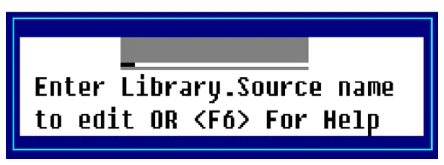
Enter the library name and the Source name that you wish to create. If the library and/or Source name does not exist, you will be given the option to create them. The format of the entered name is as follows:
LIBRARY NAME (1-4 chars).SOURCE NAME (1-8 chars)Press F2 to display a view of library names. This list contains all of the currently defined libraries. The Up Arrow and Down Arrow keys can be used to scroll to the desired library name. Pressing Enter will select that library name.
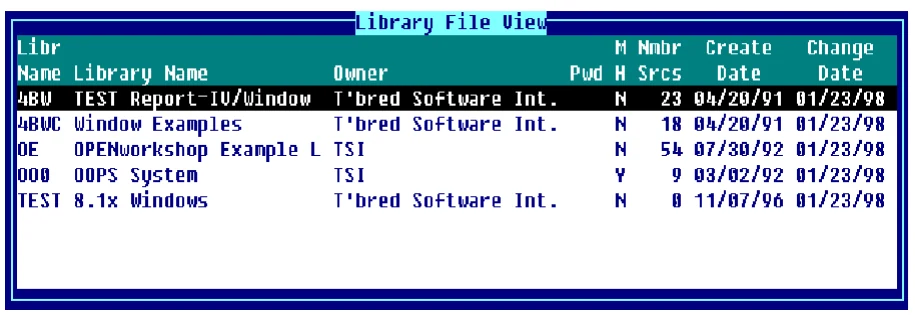
From the Library File View you can highlight the library you wish to select and press Enter to select it. The name of the library you selected is displayed in the Library.Source name window. If you enter a library name that does not exist the system displays the Create New Library Screen:

Libr Name
Type a library name (1-4 characters) any combination
of letters, numbers or characters (except spaces
? / \ * [ }@).
Press F2 for a view of library names. This list contains all of the currently defined libraries. You may wish to use the Up Arrow or Down Arrow keys to scroll to the desired library name and press Enter to select that library.
Library Description Type from 1 to 30 alphanumeric characters to describe the library being edited. This is an optional field and may be left blank.
Owner Type from 1 to 25 alphanumeric characters to define the owner of the library. This is an optional field and may be left blank.
Pwd Type from 1 to 3 alphanumeric characters for the library password. Library passwords are used to control access to Source documents. Passwords may also be specified for each Source document. This is an optional field and may be left blank. Two reserved passwords are available to specify how the resultant executable object is to be compiled; non-protected (listable) or protected (non-listable).
NOL does not restrict Source access, but causes executable object to be compiled and protected.
LON does not restrict Source access, but causes executable object to be compiled non-protected.
MH Maintain Edit History gives the user the ability to undo changes made to a Source, and to also produce an Undo Change Notice that shows exactly what changes were made to a particular Source. Type Y or N in this field. For more information, see the section on Source Locking and Edit History in this document.
This indicates whether or not Source-IV should maintain the Edit Session History for all Source in this library.
Y Edit sessions will be maintained for all Source in this library. You will be required to Lock/Unlock Source in order to make changes.
N Edit sessions will not be maintained for all Source in this library. If this was previously set to Y and edit history exists when a Source is edited, you will be prompted to remove the edit history for that Source.
There are two types of records that are maintained by Source-IV when maintaining edit history:
Lock Intervals:
Records that are created every time a Source is locked. This record is used to separate each change in a Source.
Edit Sessions:
Records that contain the changes made each time the locked Source is saved from the editor. There can be an unlimited number of edit sessions for each lock interval. For more information, see the section on Source Locking and Edit History in this document.
Nmbr Srce
This field displays the number of Source documents in the specified library.
Create Date
This field displays the date the library was created.
Lst Chng Date
This field displays the date of the last change made to the specified library.
Once a library is selected you can create a new Source within the specified library by either entering a
new Source name or pressing Line Insert from the Source File View.
Press F2 to display the Source File View:
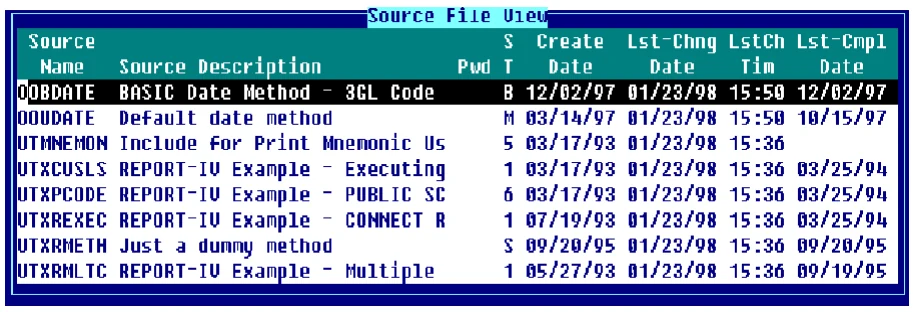
If the Source name entered does not exist in the specified library, the Source create screen will be displayed allowing you to create a new Source:

Source Name The Source name entered when creating a new Source can be from 1 to 8 characters any combination of letters, numbers or characters (except spaces ? / \ * [ ] @). The system will display the Create New Source Screen as shown above.
Source Description Type from 1 to 40 alphanumeric characters to describe the Source being created. This is an optional field and may be left blank.
Pwd Type from 1 to 3 alphanumeric characters for the Source password. Source passwords are used to control access to a Source document. Passwords may also be specified for each Source document. This is an optional field and may be left blank. Two reserved passwords are available to specify how the resultant executable object is to be compiled; non-protected (listable) or protected (non-listable).
NOL does not restrict Source access, but causes executable object to be compiled and protected.
LON does not restrict Source access, but causes executable object to be compiled non-protected.
ST
This field allows you to specify the type of Source being created. The Source types are as follows:
1-Primary (Script-IV)
Used as a starting point for processing.
2-Continuation (Script-IV)
Continuation of a primary or another continuation script.
3-Overlay (Script-IV)
Overlay to a primary, continuation, or another overlay script. It is a specialized type of continuation script that conserves memory and functions differently from a continuation script.
4-Pre/Post (Script-IV)
Used for pre/post processing in Dictionary-IV File Maintenance.
5-Copy (Script-IV/Basic)
When used in conjunction with the INCLUDE command, this Source can serve to save time and avoid duplication when writing scripts or Thoroughbred Basic programs.
6-Public (Script-IV)
Independent routing to a primary, continuation, overlay, or another public script. Having an independent data environment, the public script does not belong to a script set or have a parent script.
B-BASIC (Basic)
A Thoroughbred Basic program.
M-Method A Thoroughbred Basic program written specifically for OPENworkshop. They can be connected from a menu, screen, or view (OPENworkshop only).
P-PPS Pre/Post
Used for pre/post processing in Public Programming Services (8INPUT).
S-Method Script-IV A Script-IV script written specifically for OPENworkshop. This type should be used instead of Type 1 which is not supported in OPENworkshop, however, any existing scripts of other types can easily be changed to “S” type methods (OPENworkshop only).
U-Utility (Script-IV)
Same as a primary script, except that on startup:
The screen is not cleared.
The 3GL data environment is not initialized.
Open files are not closed; if run from a script be sure to close all open links before executing
(CLOSE ALL).
Create Date
This field displays the date the specified Source was created.
Lst-Chg Date
This field displays the date the last change was made to the specified Source.
LstCh Tim
This field displays the time the last change was made to the specified Source.
Lst-Cmpl Date
This field displays the date the specified Source was last compiled.
- Note:
- All Source-IV dates have been converted to date type 8 for Y2K readiness. Existing source libraries can be converted by using the OOSUP0 utility. This utility selection can be found on the Source-IV pop-up menu "Source-IV Update".
Once a Library.Source name is entered and you press Enter from the input field the Source Editor is invoked. If you entered an existing Source module, the Source is displayed. If you are creating a new Source module, you will have either a blank editor screen or a Source template. Templates are available for scripts and methods but not basic Source. For more information, see the Source Editor Features section of this document.
Importing a Program
Section titled “Importing a Program”From the Source-IV Main Menu select Import BASIC/SCRIPT. This selection allows Thoroughbred BASIC/SCRIPT programs from any configured disk directory or dictionary to be imported into Source-IV. You may specify a single or a range of programs to import, and into which Source-IV library these programs will be imported. The system displays the following:
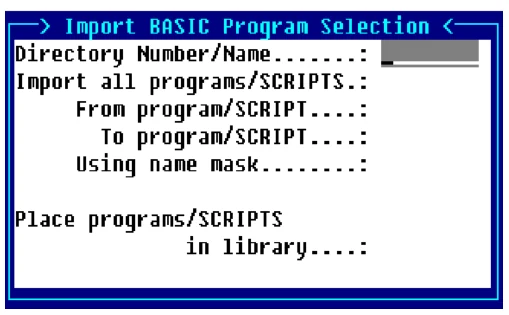
Directory Number/Name Enter the number or the name of the directory from which BASIC programs will be imported into Source-IV. Entering IDDBD will import SCRIPTS from the data dictionary.
Examples:
1
IDL4
utils
IDDBD
Import all programs/SCRIPTS?
Y All programs in the selected directory or all SCRIPTS from IDDBD will be imported.
- N
- Allows program(s) or SCRIPT(s) to be imported using From and To values, and a selection mask.
From program/SCRIPT For a range of programs, enter the name of the first program to be imported into Source-IV. If you want to start with the very first program in the directory, press Enter.
For a range of SCRIPTS, enter the library name as well as SCRIPT name (llnnnnnn).
If converting SCRIPTS, press F2 to display a view of script names. The Up Arrow and Down Arrow keys can be used to scroll to the desired script name, pressing Enter will select that script name.
To program/SCRIPT For a range of programs, enter the name of the last program to be imported into Source-IV. If Enter was pressed on the From Program/SCRIPT field and you want to end with the last program/script name in the library, press Enter. Otherwise, the program/script name entered in the From Program/SCRIPT field will also be applied to the To Program/SCRIPT field.
For a range of SCRIPTS, enter the library name as well as SCRIPT name (llnnnnnn).
If converting SCRIPTS, press F2 to display a view of script names. The Up Arrow and Down Arrow keys can be used to scroll to the desired script name, pressing Enter will select the script name.
Using name mask A mask allows selection of similar names without specifying each individual name. The mask specifies which part of the name must match exactly and question marks are used to indicate that any characters in the same position as the question marks are allowed.
Examples:
mask ABC??? (selects names that begin with ABC)
mask 12??ab (selects names starting with 12 and ending with ab)
To select names:
AAA123 AAA456 AAArty AAABCD AAAQWE
Use mask: AAA???
To select names:
12TT34 RTTTTT TTTT aaTT 1TTT23
Use mask: ??TT??
Place programs/SCRIPTS in library This is a name of a library into which the programs/SCRIPTS will be imported. If the specified library does not exist, the library create screen will be displayed and you will be allowed to create the library.
The library name can be from 1 to 4 characters long and can consist of any combination of letters, numbers, or characters except (spaces ? / \ * [ ] @).
At this field you can press F2 to display a view of library names. This list contains all of the currently defined libraries. The Up Arrow and Down Arrow keys can be used to scroll to the desired library name. Pressing Enter will select that library name.
Editing Techniques
Section titled “Editing Techniques”The sections below describe some editing techniques of Source-IV.
Compound Statements
Section titled “Compound Statements”Compound statements run faster and more efficiently than the same code broken into a number of different statements. Source-IV allows you to key in your statements so that they are easier to read and organize as separate routines.
Logic Formats (IF/THEN/ELSE-FOR/NEXT)
Section titled “Logic Formats (IF/THEN/ELSE-FOR/NEXT)”Source-IV allows you to use indentation of the code to help you see how your logic paths operate.
Conditional Compiling (IFDEF)
Section titled “Conditional Compiling (IFDEF)”IFDEF definitions are optional compile switches that can be incorporated in Source code to control which Source code statements or segments are to be included in the executable code.
When IFDEF definitions are used and before compiling, it is important to check the status of the IFDEF definitions using the IFDEF definitions selection from the Compile Source option, otherwise compilation or logic errors may result.
- Following
- is an example of how to use an IFDEF definition in a Source program:
- Example 1:
- Example 2:
| # IF SWITCH-1 | # IFNOT SWITCH-1 |
| 0100 IF A$(1,1)="X" | 0100 IF A$(1,1)="X" |
| GOTO 110 | GOTO 110 |
| # ELSE | # ELSE |
| 0100 IF A$(1,1)="X" | 0100 IF A$(1,1)="X" |
| GOTO 120 | GOTO 120 |
| # ENDIF | # ENDIF |
If SWITCH-1 is active when Example 1 is compiled, the first part of the statement is compiled, otherwise the second part of the statement is compiled. Just the opposite would result when Example 2 is compiled.
Only one level of #IF/#ELSE/#ENDIF is allowed and #ENDIF is mandatory, however there may be as many IFDEF definitions defined in the Source as required.
Format Lookups
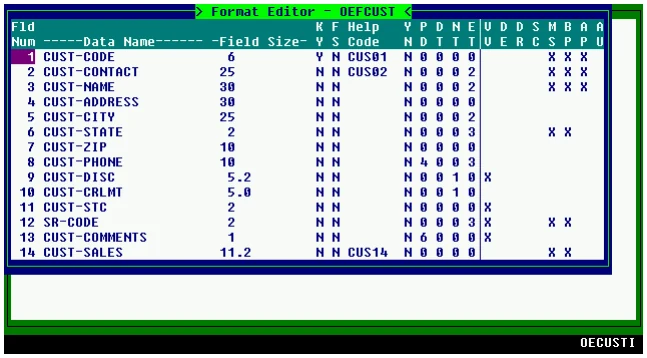
Section titled “Format Lookups”From within the editor, position the cursor over any character in a format name (i.e. #OEFCUST).
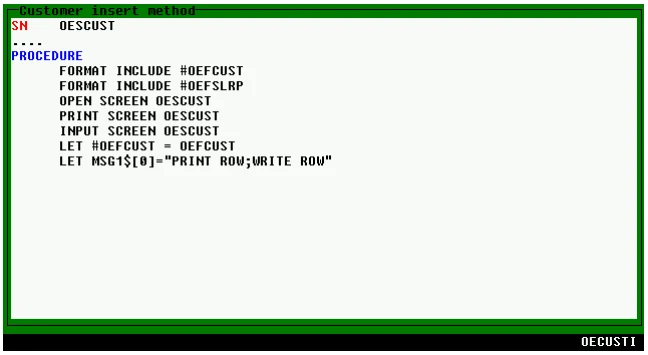
Press F3 and the format definition displays for editing.
INCLUDE Command
Section titled “INCLUDE Command”Single-Line Command
Section titled “Single-Line Command”The INCLUDE Command is a single-line command in the Source text specifying an outside Source to copy during compiling. Executing this Thoroughbred Basic program includes the COPY code. This command allows you to copy common routines that appear in a number of different programs (line numbers and variable references are the same). This allows you to use a single Source routine instead of many different Sources containing the routine. Copy links Source text together. Use this method if the Thoroughbred Basic program is too large for a single Source (the maximum size is 1500 lines).
Using F12 (Copy)
Section titled “Using F12 (Copy)”This function is used to copy the Source that you are presently editing.
You may copy from a file (full path), Dictionary-IV Help name (llhhhhhh) or Source-IV name (.llll.ssssss).
Document Names:
- lldddddd specifies a Dictionary-IV Help definition dddddd in library ll.
- .llll.dddddddd specifies a Source-IV document dddddddd in library llll.
Files:
- /usr/lib/doc1 specifies a UNIX text file doc1 in the UNIX directory /usr/lib.
- \TBSC\DOC1 specifies Microsoft Windows text doc1 in the Microsoft Windows directory \TBSC.
- D:\TBSC\DOC1 specifies Microsoft Windows text file doc1 in the Microsoft Windows directory D:\TBSC.
Cut/paste blocks:
- /<> specifies a view of cut text blocks if desired. From this view cut text blocks can be selected or deleted.
- /<>3 specifies cut text block 3.
- /<>C specifies that all saved cut text blocks are to be cleared. This option, along with the cut text block view delete option, should be used to minimize the number of cut text blocks.
Document Lookup:
- F2 displays Dictionary-IV text libraries.
- .F2 displays Source-IV libraries.
- ll F2 displays Dictionary-IV text documents in library ll.
- .llll.F2 displays Source-IV documents in library ll.
- /usr/lib/ displays files in UNIX directory /usr/lib.
(If OPENworkshop is available on your system). - /<> displays view of cut text blocks.
Compiling Source
Section titled “Compiling Source”Source Text/Basic Program Naming
Section titled “Source Text/Basic Program Naming”It is not necessary to use the same name for the Source text and Thoroughbred Basic program. However, you must compile any Thoroughbred Basic programs with names different than the Source one at a time. You cannot use the multiple compile option.
Single-Source to Compile Basic Programs
Section titled “Single-Source to Compile Basic Programs”You can use a single Source to compile Thoroughbred Basic programs with different names. All programs you generate from a Source that have different names than the programs are termed Alias Programs. They are identical programs but go by a different name (or alias).
Copy Over Existing Programs
Section titled “Copy Over Existing Programs”If you compile a Thoroughbred Basic program with the same name as an existing program, the new program replaces the old one. Be sure that you transfer any changes you made to the old version to the Source before you compile it.
Erase Existing Programs
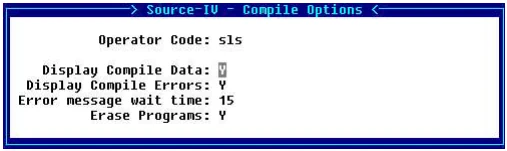
Section titled “Erase Existing Programs”Source-IV allows you to erase all copies of a compiled program accessible from the IPL DEV lines. This feature is enabled by default and can be set at the operator code level.
To disable this feature, from the main Source-IV menu select Compile Menu and then select Compile Options. Set the Erase Programs to N.
Source Text Comments
Section titled “Source Text Comments”Comments in the Source text do not transfer to the Thoroughbred Basic program.
From the Source-IV, version 8.9.1. Open this page in the PDF