

*KPSD - List Programs
Purpose
This utility produces formatted program listings on the printer. This utility can also produce cross-reference listings of numeric variables, string variables, statement numbers, and available variable maps for one or more programs.
Procedure
To run this utility from Thoroughbred Basic Console Mode, type:
RUN “*KPSD” and press Enter.
To select this utility from the Thoroughbred Basic Utilities Menu, type one of the following:
K and press Enter.
*K and press Enter.
*KPSD and press Enter.
Menu option # and press Enter.
The following message is displayed:
SELECT PRINTER: xx xx: (where: xx is a configured printer)
Make your selection from the list of available printers displayed in the prompt. Printers displayed in background mode are currently being used by another task and, therefore, are unavailable. If the printer requested cannot be opened, the user is prompted to make another selection. If only one printer is configured this question is not asked.
PAGE WIDTH (CR=80)
Type the maximum number of characters to be printed on one line. This value must be between 55 and 132. The default is 80. The width cannot exceed the maximum width specified for the printer in the IPL file. The system will respond with the following prompt:
MAXIMUM LINES PER PAGE (CR=60):
Type the maximum number of lines to be printed on each page. This number must be between 30 and 256. The default is 60. The system responds with the following screen:
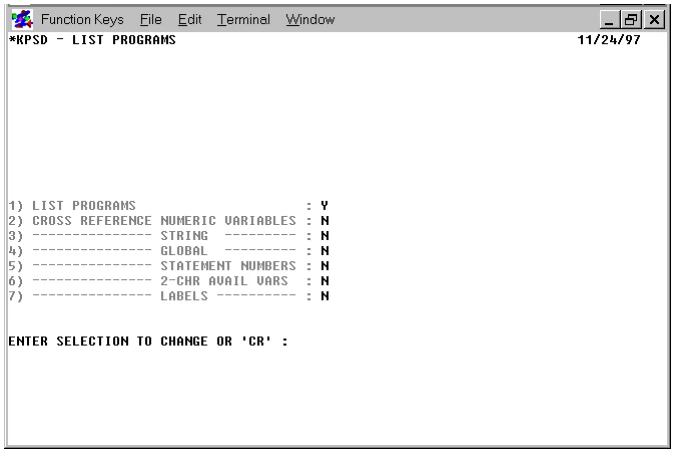
The following chart outlines the different information provided by each option above:
| Option | Information Provided |
|---|---|
| Variable Cross Reference Listings | Lists each variable used followed by the numbers of all statements in which it is referenced |
| Global Listing | Lists each variable followed by the names of the programs in which it is used |
| Statement Number Cross Reference | Lists each statement number followed by the numbers of the statements that reference it |
| Available Variables Listing | Lists all valid, available Thoroughbred Basic variable names, including numeric arrays. Dashes (–) indicate a variable that has been used |
Type the numbers of the selections you want to change (they may be stacked, i.e., typing 1234 and pressing Enter changes selections 1, 2, 3, and 4) and press Enter. If all selections are N or if selection 4 is Y and selections 2 and 3 are N, the program will not accept the information and returns to the “ENTER SELECTION PROMPT”.
TITLE
Type a character string to appear at the top of each page of the output listing and press Enter. If the first line of the program(s) is a REM(ark) statement, pressing Enter prints the REM as the title. If the first line is not a REM statement, the title field will be blank.
The system prompts:
DISC NAME OR NUMBER:
Type the name or number of the directory on which the program resides.
ENTER FILENAME OR MASK; (@) FOR ALL, (CR) TO END
Type up to 48 files names or masks and press Enter. Type @ and press Enter to include all the files. If a specified file does not exist on the disk, or if a specified file does not match the file mask entered, the name is rejected. After entering each name or mask, press Enter once. After all names or masks have been entered, press Enter again to continue with the procedure. When the listing is complete, the system automatically returns the Thoroughbred Basic Utilities Menu.
Notes
This utility assumes that the programs are broken into the following sections and, therefore, prints appropriate headers:
- ####-####
- IDENTIFICATION
- ####-####
- INITIALIZATION
- ####-####
- MAIN PROCESSING
- ####-####
- SUBROUTINES
- ####-####
- ERROR PROCESSING
- ####-####
- TERMINATION
Note: The program sections described above are conventions applied to printing a program listing and do not impose any programming requirements on the user.
The start of the subroutine section may be advanced by including a REM with *S* as the first three characters. This will cause the subroutine heading to be shown with the range nnnnn-07999 where nnnnn is the statement number of the REM.
Error Messages
- CAN'T DEFINE WORK FILE
- The work file used in cross-referencing could not be created. The utility returns to the option selector.
- ERROR 0 HAS OCCURRED, PRINTER PROBABLY OFF-LINE
- The requested printer is off-line (i.e., not turned on, out of paper, out of toner, etc.). You can correct the problem and try again, select another printer, or press F4 to exit.
- LIMIT IS 48 NAMES/MASKS
- The maximum number of filenames or masks has been entered (48). The utility now begins its directory search.
- MAXIMUM WIDTH FOR SELECTED PRINTER IS xxx (HIT CR)
- The entered width exceeds the maximum width of the printer. Press the Enter key, and then enter a new value.
- PRINTER IN USE
- The requested printer is being used by another task; select another.
- PRINTER NOT READY
- The requested printer is off-line (i.e., not turned on, out of paper, out of toner, etc.). You can correct the problem and try again, select another printer, or press F4 to exit.
From the Thoroughbred Basic Utilities, version 8.9.1. Open this page in the PDF